
The real problem is usually not collecting links
You can bookmark a page in seconds. The harder part is knowing which link belongs to which project after several days of browsing. A developer might have API references mixed with job openings and product inspiration. A student might save research papers alongside unrelated tutorial videos. The URLs are all there, but the collection stops being useful.
A named collection solves a specific problem: keep links for one purpose together. That is the design behind URLPluck's local Collections and dashboard.
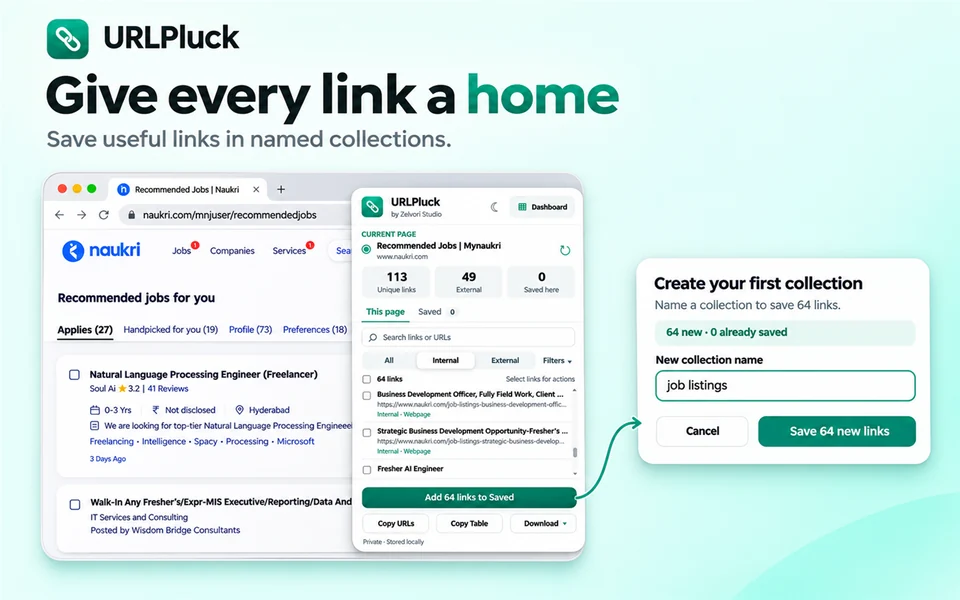
A simple three-collection system
Start with collections named after actual outcomes, not vague subjects:
| Collection | What goes into it | Next action |
|---|---|---|
| Job opportunities | Career pages and job descriptions | Apply or shortlist |
| Developer references | API documentation, examples, SDK pages | Build or debug |
| Research sources | Articles, reports, public datasets | Read and cite |
Avoid one enormous collection called “Useful links.” It is difficult to maintain and easy to ignore.
A repeatable workflow across sites
- Browse a relevant page in Chrome and open URLPluck.
- Filter out obvious noise. Select the links worth keeping.
- Save them into an existing named collection or create a new one for that project.
- Move to another website and repeat, choosing the same collection for related resources.
- Open URLPluck's dashboard to review, search, sort, select, or remove saved links.
- Export the collection when you need to share or analyze it elsewhere.
The key difference from ordinary copying is continuity: you do not have to start from scratch every time you open a new webpage.
Why local storage matters
URLPluck's current extension works without an account; its saved link collections are stored in browser extension storage, not automatically synchronized to your other devices. This gives you a simple, account-free workflow, but it also means local data needs a backup plan.
The extension offers local JSON backup and restore. Export a backup before resetting Chrome, changing computers, reinstalling extensions, or making major changes to your profile. Keep that file in a location you control. A browser backup is not the same as an always-on cloud synchronization service.
What makes a collection good?
Keep a collection focused enough that someone can understand it from the name. Review it occasionally. Remove irrelevant or outdated links rather than preserving everything forever. If you need task status or collaboration, export to CSV and add owner, deadline, or review columns in a spreadsheet.
There is a useful distinction between link collection and reference management. Tools like Zotero provide citation metadata, bibliographies, and more specialized research functions. URLPluck is well suited to capturing and organizing URLs before you decide what deserves full citation management.
A realistic example: researching one software product
Suppose you compare note-taking tools. On each vendor page, save the product overview, pricing, privacy policy, and documentation link. Keep all selected URLs in a collection named “Note-taking comparison.” When you are finished, export CSV and add columns for pricing model, offline support, and your own evaluation. Now the collection is a source list instead of a tab explosion.
The same pattern works for interviews, competitor research, lesson planning, and SEO checks. URLPluck's value here is not that it can find information you cannot see. It is that it helps keep the links you chose organized and portable.
Try URLPluck for free. Extract, review, save, and export URLs from the page you are browsing.
Sources and further reading
Official documentation and public product listings used to verify key points. Links open their original websites.