
Internal and external links are different jobs
An internal link leads to another location within the same website or site scope. An external link points outside that scope. Site owners review internal links to understand navigation and content relationships; researchers use external links to find references, tools, and sources cited by a page.
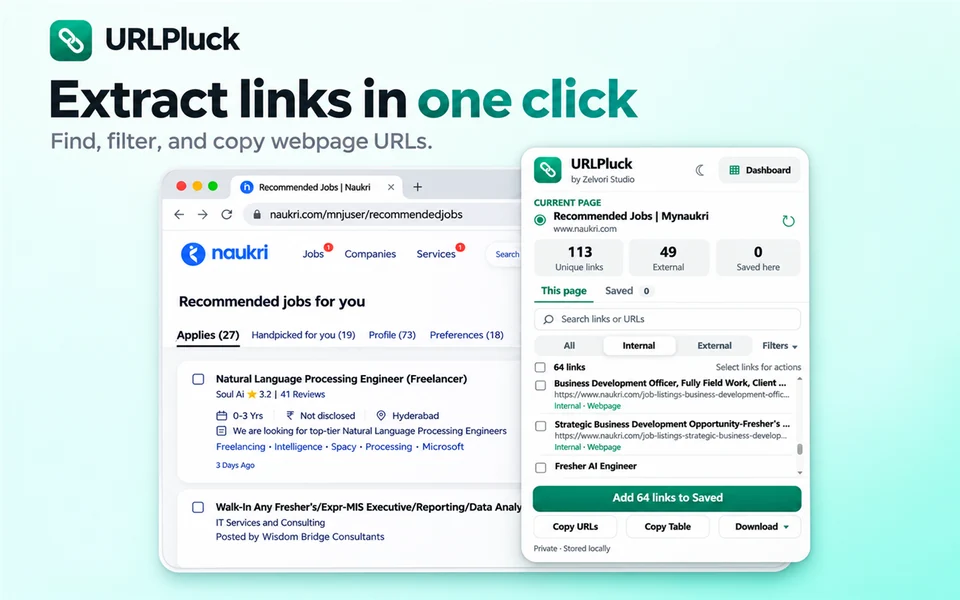
In a browser extension, the exact internal/external classification depends on how the tool defines “same site.” URLPluck's current extraction logic compares the link's origin with the current page's origin. That means changes in scheme, host, or port can affect how the link is classified. A subdomain such as help.example.com may therefore appear external to www.example.com even when both belong to one organization.
Why SEO teams pay attention
Google's link best practices explain that crawlable hyperlinks help its systems discover pages and understand relevance. Descriptive anchor text also helps users and search engines make sense of the destination. A page-level link review can reveal weak or repetitive anchor text and help you understand which pages receive attention from a particular page.
But an extracted list alone cannot measure every factor in an SEO audit. It does not tell you whether a target returns a 404, whether it is indexed, or how PageRank flows through the entire site.
How to separate the two sets with URLPluck
- Open the page you want to review and run URLPluck.
- Switch the scope to Internal to inspect links staying on the page's origin.
- Search for key sections such as
/blog/,/docs/, or/products/. - Export or save the results if you want to review them elsewhere.
- Switch to External to inspect third-party references and outbound destinations.
- Review unexpected entries manually, especially subdomains and redirects.
URLPluck also supports domain filters, which can be useful for narrowing the results further.
Example: reviewing a documentation page
URL on a page at https://docs.example.com/guide |
Likely scope in URLPluck |
|---|---|
https://docs.example.com/setup |
Internal |
https://docs.example.com/api |
Internal |
https://www.example.com/pricing |
External (different host) |
https://github.com/example/project |
External |
These are illustrative URLs, not live records. The distinction is intentionally more technical than the casual business meaning of “same company.”
What to look for in internal links
Check whether important pages are easy to reach, whether link labels tell users where they lead, and whether the same destination appears in unnecessary repeated site elements. Avoid trying to force links everywhere merely to inflate a count. The W3C advises meaningful link text so visitors can understand destinations without guessing.
What to look for in external links
Inspect whether outbound sources are trustworthy and relevant, whether older references still describe the current information, and whether external promotional links need additional review. A hyperlink to another site is not proof that the linked content remains correct.
Understand the limitation
URLPluck extracts links from the current open webpage. For a whole-site internal-link graph, crawl depth analysis, redirect checks, or comprehensive broken-link detection, you need a dedicated site crawler or audit tool. Think of URLPluck as a convenient way to gather and sort page-level evidence for manual review.
Try URLPluck for free. Extract, review, save, and export URLs from the page you are browsing.
Sources and further reading
Official documentation and public product listings used to verify key points. Links open their original websites.