
What does “extract all links” actually mean?
A webpage contains hyperlinks in many places: article text, navigation menus, product cards, footers, and related-content panels. In HTML, ordinary clickable hyperlinks are usually written as an <a> element with an href attribute. MDN explains how anchor elements work, including links to other pages, files, and sections of a document.
A page-level link extractor gathers the links currently available in the open browser tab. That is not the same as crawling every URL on an entire domain. If a website has 20 category pages, a page extractor will not automatically visit all 20. You can still work through them one by one and organize the results.
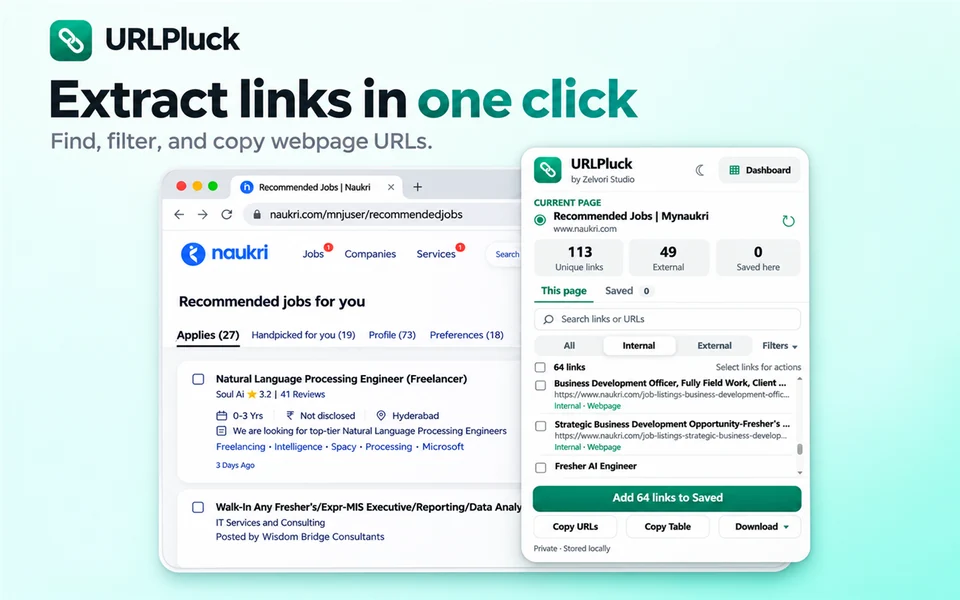
The fastest no-code workflow
- Open the webpage you want to collect links from in Google Chrome.
- If the page loads more entries as you scroll or click Load more, load the relevant entries first.
- Open URLPluck on the Chrome Web Store, install it, and click its toolbar icon while viewing the page.
- Review the list of extracted links. Search within it, or filter to internal links, external links, domains, or link types.
- Select what matters. Copy URLs, Copy Table, save them to a named collection, or download a file.
Example: On a page containing 60 documentation references, you may only need links to PDF files. Filter by document type instead of manually opening every result. A few links may be navigational or duplicates; review the filtered result before exporting.
Why the first extraction may contain “extra” links
The browser sees more than the main article. A page can link to the same contact page from its header and footer. It can include social profiles, privacy pages, related posts, and promotional banners. These are legitimate links, but they may not be useful for your project.
URLPluck provides optional filters for internal/external links, domains, file types, common navigation/footer links, and external social links. Treat those filters as helpers, not perfect classifiers. A useful document could appear inside an unusual page section; always scan the results once.
A small example of the output
Imagine a resource page with the following clickable links:
| Link text | Destination | What you may do |
|---|---|---|
| API guide | https://example.org/docs/api |
Keep for development |
| Annual report | https://example.org/files/report.pdf |
Keep; filter as PDF |
| Community | https://forum.example.net/ |
Keep only if external links matter |
| Privacy | https://example.org/privacy |
Exclude if collecting resources |
URLPluck reads links from the current page. The table is illustrative, not a live capture from that domain. If the same URL appears several times, the extension's duplicate handling helps reduce repetition.
When links appear to be missing
A link extractor cannot reveal URLs that the page has not loaded, data hidden behind an account you cannot access, or links implemented as nonstandard click handlers rather than ordinary anchors. Google also distinguishes crawlable links from JavaScript-only navigation in its link best-practices documentation.
Try loading the page completely, expanding the relevant sections, and extracting again. For a multipage directory, repeat the process on each page. Do not assume an extraction gives you a complete inventory of the entire site.
Make the results reusable
If you need the links once, copy them. If you need to work with the list later, export CSV for a spreadsheet or JSON for a development script. If you expect to revisit several pages over time, save selected URLs to a named URLPluck collection. Collections live locally in the browser, and you can use the extension's local JSON backup/restore option to preserve them.
For a shorter walkthrough, see our quick guide to extracting webpage links. For a deeper look at organizing results from many pages, continue with the collections guide below.
Try URLPluck for free. Extract, review, save, and export URLs from the page you are browsing.
Sources and further reading
Official documentation and public product listings used to verify key points. Links open their original websites.